FAQ - frequently asked questions
-
1.
Orders
-
1.1.
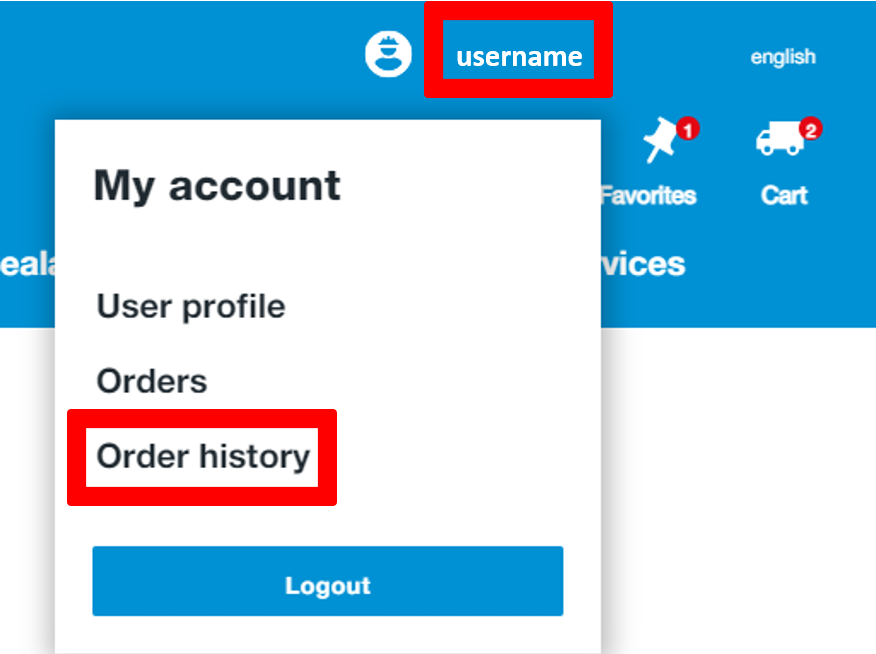
Where can I find information about my old orders?
Hover over your username in the top right corner and click on "Orders".
-
1.2.
Can I change an order that has already been sent?
Contact your SIGA contact person immediately (see "Where can I find my SIGA trainer?").
-
1.3.
How can I add products to a commission?
-
1.4.
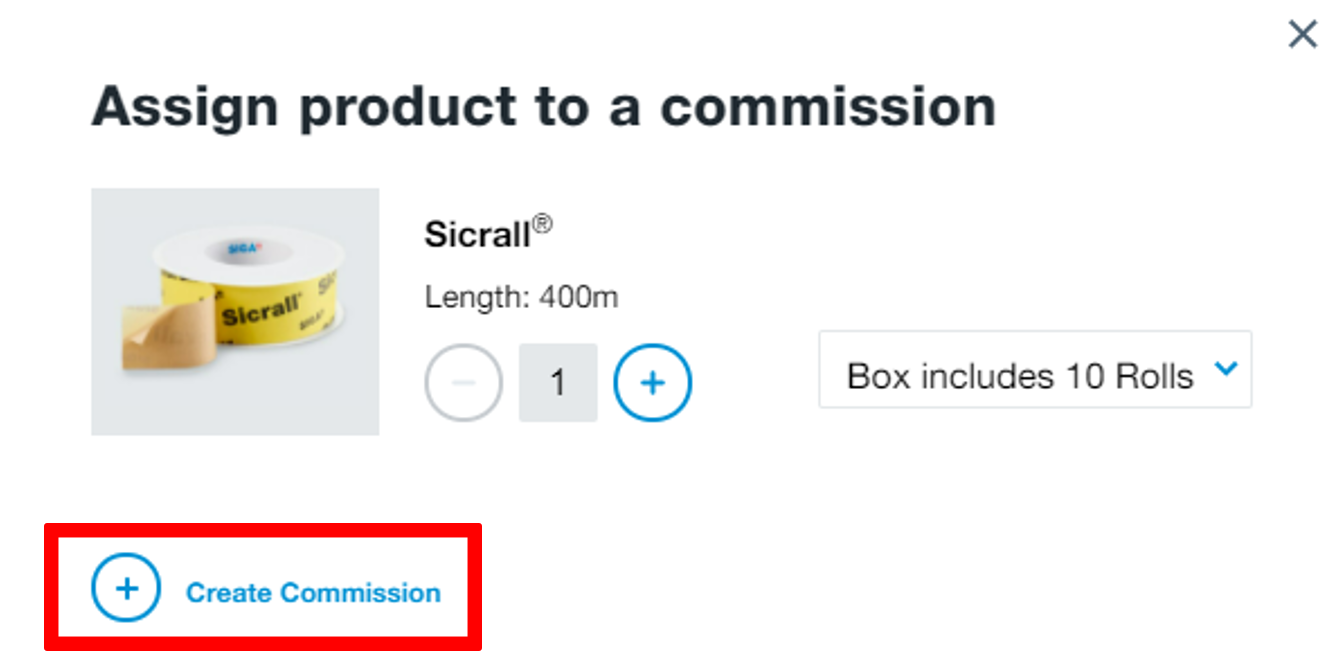
How can I create a commission?
Click on the list icon with the plus sign (see "How can I add products to a commission?") at the product you want to add to the commission and select "Create commission".

-
1.5.
How do I create a Favorites list?
Click on the pin image for the corresponding product and create your individual watch list.
-
1.6.
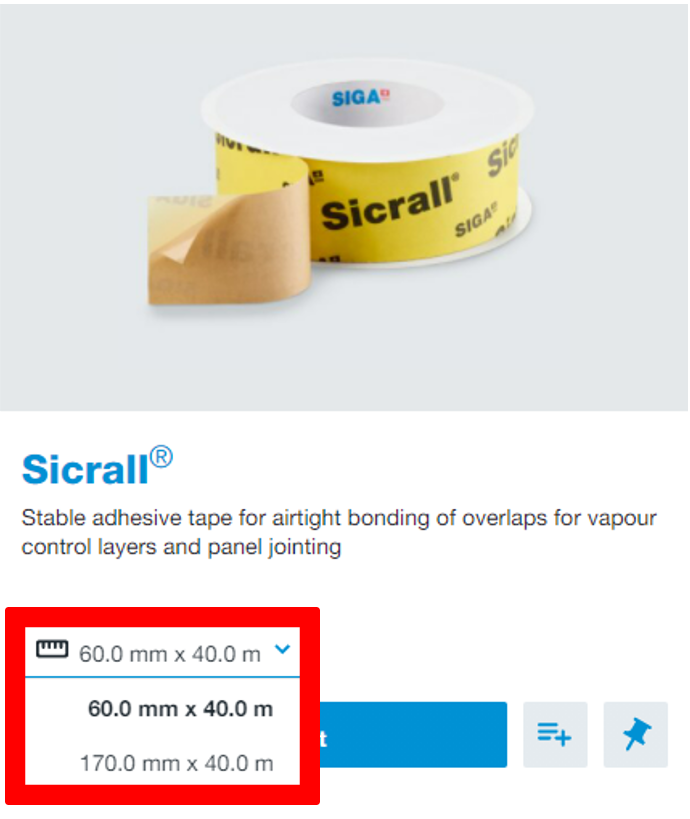
I can no longer find my product in a different size/length.
Just click on the dropdown on the right side of the product, there you will find all available sizes and lengths.
-
1.7.
How to order personalised products?
Visit Customer-specific production page (CSP) to find out more detailed information about your options to order as well as its advantages.
-
1.8.
Do I have to add the products to the shopping cart again if I have forgotten to log in?
No, the products are still in your shopping cart after you log in, as long as you log in again in the same browser.
-
1.9.
Is the shopping cart saved without logging in?
Yes, the products in your shopping cart are saved for you, even without registration.
-
1.10.
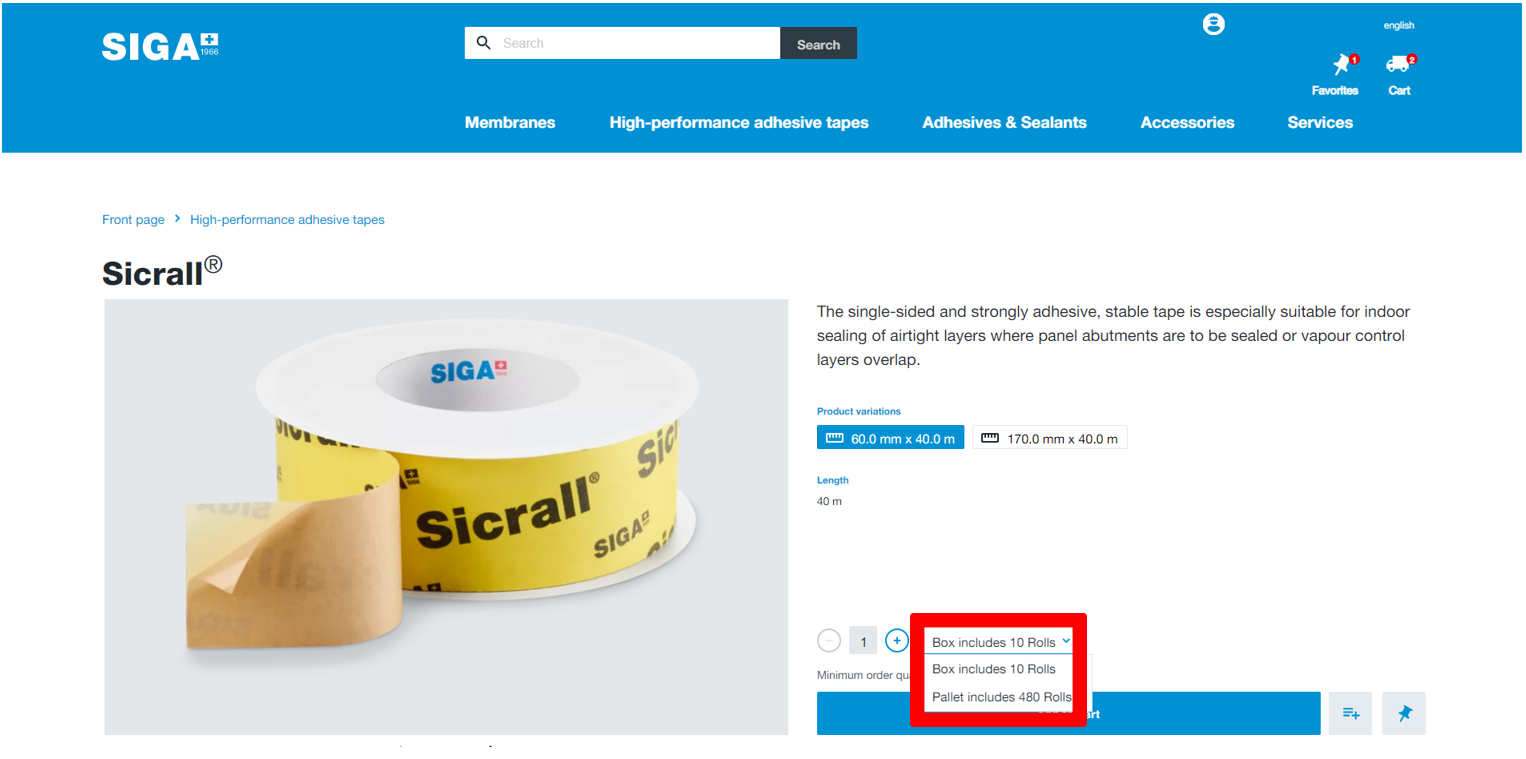
How can I change the packaging unit of my order?
Add the product to the shopping cart. In the confirmation window, which appears at the top right, you will find a dropdown where you can see the different packaging units. Alternatively, you can also do this for the product on the detail page. To do so, simply click on the product and select which unit you want in the dropdown and then add the product to the shopping basket.
-
-
2.
Delivery
-
2.1.
What delivery options are available to me?

-
-
3.
Payment options
-
3.1.
What payment options do I have?
At the moment you can pay for our products by invoice.
-
-
4.
My account
-
4.1.
Why can’t I log in?
Click on "Display" to see the password as you write it. Make sure you don't use any spaces and check that the email address you use is correct.

-
4.2.
How can I change my password?
To change your password, click on your username and scroll down. There you will see the "Login" section. Now click on "Change password" on the right-hand side and change your password.
-
4.3.
How do I unlock my webshop account if I have logged in incorrectly several times?
You can either click on "Forgotten password" and then set a new password or contact your SIGA trainer.

-
4.4.
Why do I not receive an e-mail when I click on "Forgotten password"?
Check your spam folder, sometimes emails end up in this folder. Also check the email address you entered. Alternatively, you can use SMS verification to log in via SMS (see "How can I deposit my mobile phone number?"). If you still do not receive anything, call your SIGA trainer.
-
4.5.
How does the SMS verification work?
Click on the link "To SMS verification", then select your number in the dropdown and add the last 4 digits. Now click on "Send" and you will receive the code via SMS, which you then complete and confirm in the browser.
-
4.6.
Who do I contact in case of webshop problems?
If you have any problems with your webshop, please contact your SIGA trainer. If he is not available, you are welcome to contact us on +41 41 499 69 20.
-
4.7.
What do I do if I am blocked for 2 minutes after entering the wrong password several times?
You have the following options:
- Wait 2 minutes and enter the correct password.
- Click on "Forgotten password" and unlock yourself by setting a new password
-
4.8.
How can I deposit my mobile phone number?
Contact your SIGA trainer (see "Where can I find my SIGA trainer?") and leave your mobile phone number with them in our system.
-
4.9.
How do I register?
Go to "Login" at the top right and click next to “New business customer?” onto “Start here”. Then enter your e-mail address and fill in all the other fields. We will then check your details and you will receive an access email after verification.
-
4.10.
How do I create a (further) user?
Contact your SIGA trainer (see "Where can I find my SIGA trainer?") and leave the corresponding e-mail address for which you would like an additional user.
-
4.11.
Where can I find my SIGA contact person?
To find your SIGA trainer, log in to your account and scroll to the bottom. There you will find all the information you need. Alternatively, you can click on your username and you will find the details on the left.
-
4.12.
How can I change my profile picture?
To do this, click on your user name and then select "Change profile picture" in the user profile to save a new picture.
-
4.13.
Where can I purchase SIGA products if I am not a business customer?
In order to purchase SIGA products as a private person, we recommend that you look for one of our specialist dealers in your area. You can do this easily by scrolling down to the help section and clicking on "Retail outlets".
-
-
5.
Product questions / applications
-
5.1.
What does the abbreviation "SOB" mean?
You will find the abbreviation "SOB" on our membrane products. It means "SIGA on board" and means that an adhesive tape is directly integrated on the membrane.
-
5.2.
Why do I need a primer?
You need a primer if the surface is dusty, dirty or not stable. With the help of the primer, you can consolidate it and then apply adhesive tape to it. To see which substrates are often affected, take a look at our Substrate Matrix.
-
5.3.
How do I get help with difficult calculations?
To get help, log in with your account and click on Services. Then you will find a tile "Building physics calculations" click on it and enter all the necessary information and then submit the document. You will be contacted by our Application Engineering Team.
-
5.4.
How can I train my staff?
If you want to benefit from our knowledge, then register your employees for a training course. We have various offers for this. Register and click on services, there you will find our training offers.
-
5.5.
How do I quickly & easily find the products I need?
The best thing to do is to go to the desired product category (membranes, adhesive tapes or adhesives & sealants) and then filter the conditions you need on the left-hand side.
-
-
6.
General questions about the building envelope
Visit our SIGA blog. There you will find many articles on the subject of mould or the air and windtight building envelope in general. Enjoy reading!
-
6.1.
How do I prevent mould?
The most common reasons for mould growth are wrong ventilation or heating by the occupants. Read our blog for more detailed information on what you can do to prevent mould.
-
6.2.
What is "hygrobrid technology"?
We have taken a closer look at the secret of cacti and solved it. Cacti are able to absorb moisture and not release it again. We have applied this behaviour to our vapour control layer Majrex® and patented it. We call this moisture transport to only one side "Hygrobrid". Would you like to learn more? Click on the link to go to the blog.
-
6.3.
Why do I need a BlowerDoor test?
You do a BlowerDoor test to find out whether the building envelope is airtight everywhere. If you want to know more about this topic, go to our knowledge article now.
-


